You can create orders in the Fortis POS Platform and send them for payment through a POS device or by using a payment link.
Steps
Sign in to the Fortis POS Platform at https://my.fortis.world/auth/login.
Go to Orders and click Create.
Add items from the Catalog by typing the item name and selecting it from the list. You can also add Non-Catalog items. Click Next when finished.
-
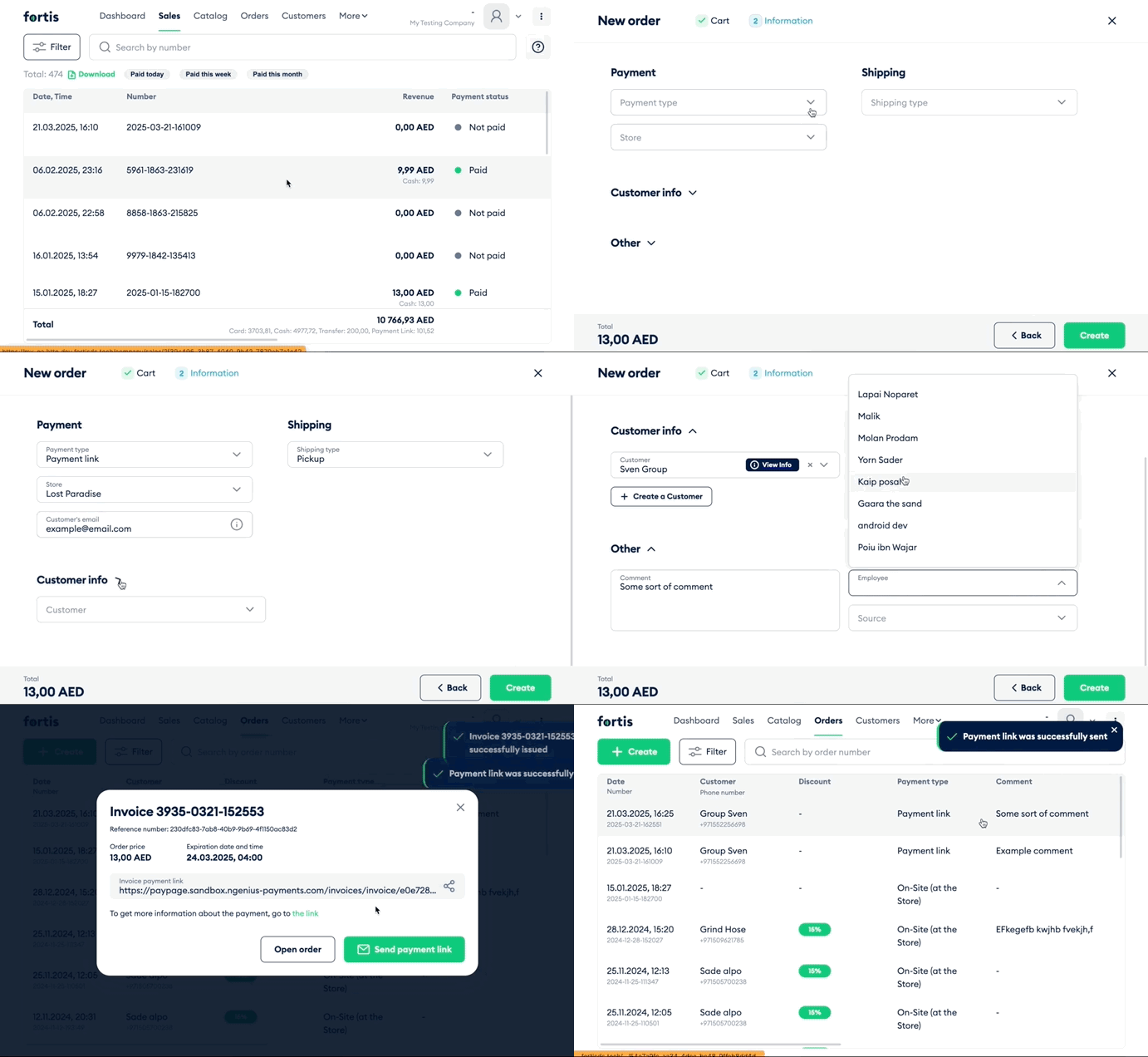
Select a payment method:
On-Site: Create a sale and select a POS device to process the payment.
Payment link: Generate a link that can be sent to the customer.
If using a payment link, enter the customer’s email address if you want to send the link by email.
Select a shipping method. The customer’s address will appear, or you can add one if it is missing.
Select an existing customer, edit their profile, or create a new customer.
Click Check loyalty data to see if the customer is eligible for a loyalty discount, and apply it if needed.
Complete the remaining fields, such as order source, assigned manager, and comments.
Click Create.
If you selected Payment link, generate the link and share it via WhatsApp or email.
If you selected On-Site payment, click Submit for Payment, choose the POS device, and complete the payment. The sale will be linked to the order and visible on both the POS device and the platform.