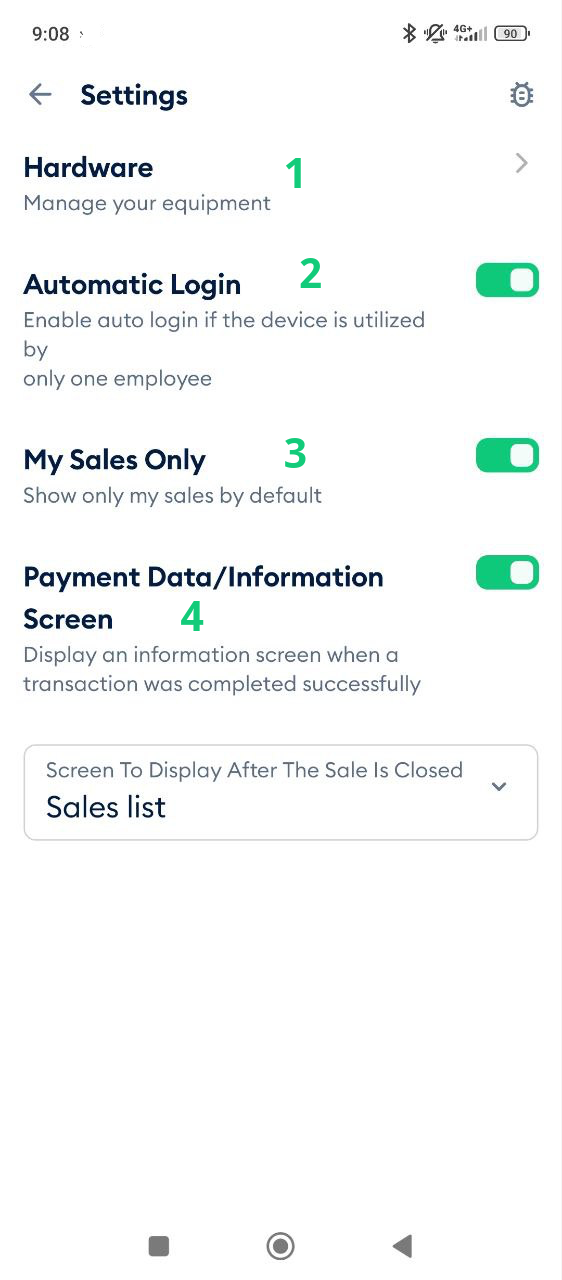
The Settings section of the Fortis POS App allows you to configure the application to match your operational needs and usage preferences. To access these options, tap Settings from the main screen.
The Hardware section (1) displays information about connected devices such as printers, scanners, and other peripherals.
The Automatic Login option (2) is useful when the device is operated by a single user. When enabled, the app remains logged in, eliminating the need to re-enter the registered phone number each time the app is launched.
The My Sales Only option (3) filters the sales list to display only transactions created by the currently logged-in user. This is helpful in locations with multiple employees where the sales list may be extensive.
The Payment Data / Information Screen option (4) allows you to control whether a confirmation or information screen is shown after each successful payment.
The Screen to Display After Sale Closure menu (5) lets you define what screen appears once a sale is completed, either the Sales List or the New Sale screen.