Making a discount is the most common way of attracting customers and managing sales. Fortis POS App provides you a bunch of simple and flexible tools for managing discounts on the go.
Sale Discount
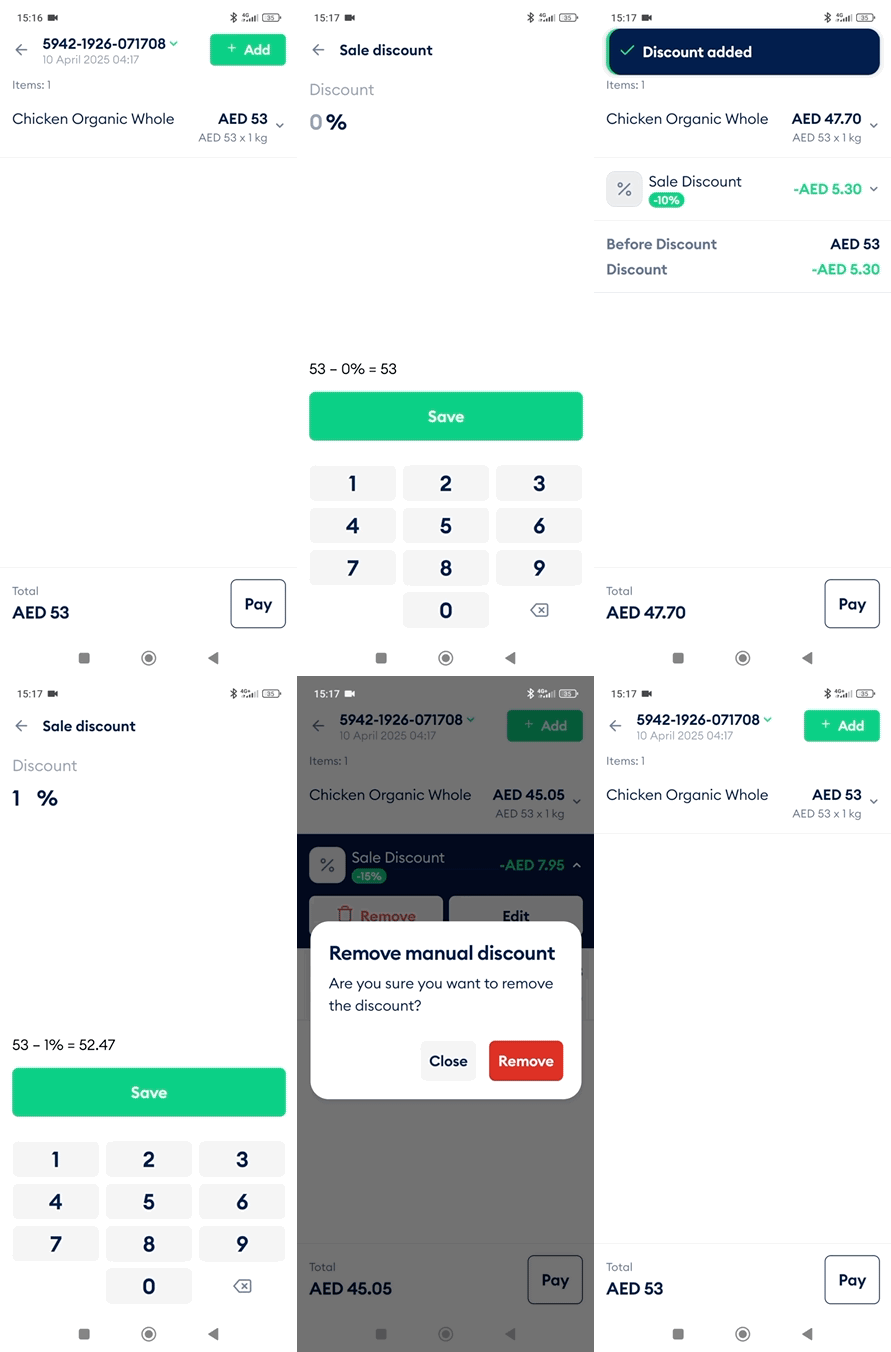
A sale discount is applied to the entire cart and adjusts the total amount.
Steps
Log in to the Fortis POS App.
Go to Sales.
Tap New Sale and proceed to To Cart, or open an existing sale from the list.
In the Cart screen, tap Add and select Discount.
Enter the discount percentage and tap Save.
The discount appears at the top of the item list. Tap it to Edit the discount, or tap the red bin and select Remove to delete it.
Item Discount
An item discount applies only to a specific item in the cart and adjusts that item’s price.
Steps
Log in to the Fortis POS App.
Go to Sales.
Tap New Sale and proceed to To Cart, or open an existing sale from the list.
In the Cart screen, tap the item you want to discount.
Tap the three-dot menu and select Item discount.
Enter the discount as a percentage, or select Amount and enter a fixed discount in AED. Tap Save.
To modify the discount, tap the item again and open the Item Discount screen.
To remove the discount, enter 0% or AED 0 and tap Save.